
Training that holds on the floor
Stop the move until the course is done
If a treatment requires an Internal Course, Steelhead will not let an operator move parts into it until they have finished that course. The move dialog names the course, links to it, and leaves the save button off. The same block applies when a completion has expired.
One record of who is current
Assign a published course to individual people, with a due date if you want one. Review completed, in progress, overdue, and expired work, and open an assignment to see progress and quiz attempts.
Retake it on your schedule
Set a recertification period in months, or mark the course so it never expires. When the period ends, the course shows Expired. If it is required for a treatment, that operator cannot move parts there until they recertify.
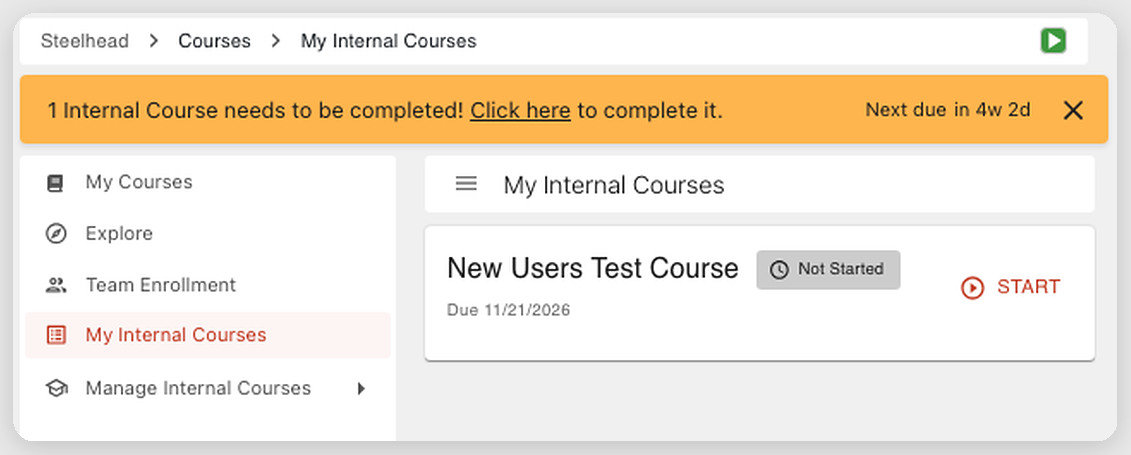
Every employee sees their assigned courses in one place
Employees see every course assigned to them on My Internal Courses, with overdue work at the top, and a reminder in Steelhead flags anything still to finish. They start or resume a course, read each section, take the quiz, and complete it. Progress and quiz answers save as they go, so they can leave and pick up where they left off.
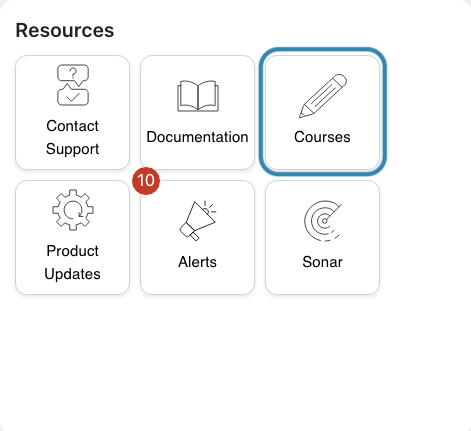
Operators do not need extra access to take a course assigned to them. They open it from the Courses tile in Resources on the homepage.
What your team builds
Sections your shop writes
Give the course a unique title and, if you want, a description on its overview. Add sections of text and images, in the order you create them. A section can include a knowledge check. Those answers are recorded, and they do not count toward the score needed to finish the course. A draft saves as you work.
One quiz at the end
A course can have one quiz, taken at the end. Set a required score, or require no score, and set how many attempts are allowed, or leave them unlimited. Questions can be multiple choice, multiple select, or a file upload of a photo or PDF up to 25 MB. You can explain each answer after the quiz is submitted. When someone runs out of attempts, a supervisor resets them.
Publish, then revise
Only a published course can be assigned. Each quiz question needs text, at least one answer, and a correct answer before you publish. A published course cannot be unpublished, but it can be archived. To change it, start a revision. Assigned people keep seeing the published course until that revision is published, and anyone who already finished keeps that completion.
Notifications you can turn on
In notification preferences, the Courses section can tell someone a course was assigned to them, that a course they assigned is due soon or overdue, that their certification is about to expire, or that a certification they assigned is about to expire.
How it works
Steelhead's own courses, in the same place
Steelhead Courses, also called Steelhead University, are the tutorials Steelhead writes for learning the ERP. They open from the same Courses tile. Recommended courses follow the access each person has. Administrators enroll people, set a due date, or opt them out, and anyone can explore the library and enroll themselves.
Onboarding courses get a new user familiar with their role. Masterclasses go deeper on modules such as quality, specifications and certifications, scheduling, shipping, and invoicing. Operator training is available in Spanish, and the text of an English course can be translated in the browser. During deployment, Steelhead Customer Support helps enroll your team in the tutorials that match what you use.
Progress saves automatically. Each of these courses ends with a quiz, and a passing score is at least 70%. Knowledge checks along the way are not part of that score. A learner can retake the quiz until they pass. Sonar is available inside these courses, so they can ask a question and get an answer from Steelhead's documentation while they learn. A reminder on the Courses tile shows how many enrolled courses are still open.